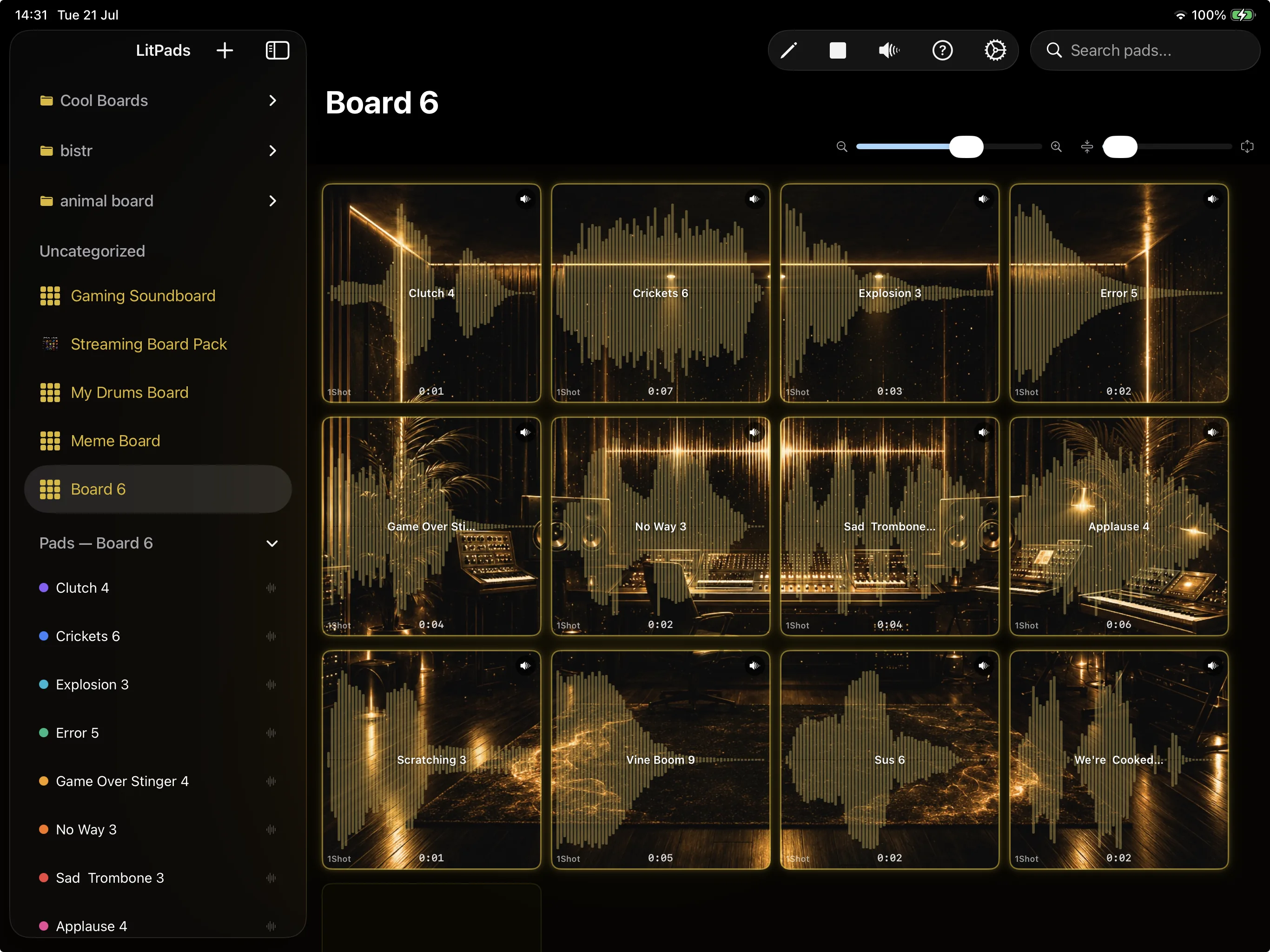
Why Is iPad the Best Platform for a Soundboard?
- 4-column pad grid dynamically sized square pads in landscape
- Haptic feedback physical confirmation on each tap
- Bluetooth MIDI wireless controller support via CoreMIDI
- Background playback lock screen controls for uninterrupted performance
The iPad version of LitPads includes every audio processing feature available on Mac: per-pad parametric EQ with spectrum analyzer, pitch shifting, stereo pan, audio ducking, fade in/out, and all four play modes with retrigger modes. The only features exclusive to Mac are global hotkeys (via Input Monitoring) and the floating favorites panel.
iPad portability makes it the preferred platform for stage performance. The device sits on a mic stand mount, keyboard stand, or DJ booth surface. Musicians, DJs, and theatre operators carry the complete soundboard setup in a tablet, not a laptop bag.
How Does the iPad Pad Grid Compare to Mac and iPhone?
The iPad sidebar shows boards, a collapsible pad list with drag-to-reorder, and setlists. All orientations are supported (portrait and landscape). Split view and slide-over compatibility let performers run LitPads alongside a lyrics app, setlist manager, or reference material.
The full-screen trim editor maximizes waveform detail on the iPad screen. Pinch-to-zoom handles from 1x to 20x magnification. Large 60-point invisible hit areas around trim handles make finger grabbing precise on the touchscreen. The soundboard app for iPhone covers the differences between the iPhone compact layout and the iPad expanded layout.
How Do MIDI Controllers Work with LitPads on iPad?
Bluetooth MIDI controllers are the cleanest setup for iPad on stage: no cables, no adapters, instant pairing. Battery-powered Bluetooth pad controllers and keyboards sit alongside the iPad without any physical connection. USB controllers require an adapter but offer lower latency and no battery concerns.
The MIDI soundboard guide covers controller selection, mapping strategies, and velocity curve optimization for different performance styles on iPad and Mac.
How Do You Use Setlist Mode on iPad for Live Shows?
Theatre sound operators running shows from iPad position the device at the tech table or stage manager's desk. The GO button is large enough to tap reliably in low-light tech booth conditions. Haptic feedback confirms the tap. Auto-scroll keeps the current cue centered without manual scrolling. Operators arriving from the QLab world will recognize the workflow, covered side by side in the QLab iPad alternative with cue list mode.
Musicians using setlist mode for concert performances organize songs, backing tracks, and between-song cues in a predetermined order. The setlist advances through the show structure while individual pads remain accessible for improvised effects. The Mac soundboard comparison covers platform-specific setlist features.
What Are the Best iPad Accessories for Soundboard Performance?
For venue PA connections, use a USB audio interface with a camera connection kit for balanced output. The iPad headphone output is unbalanced and picks up interference in noisy stage environments.
For venue PA connections, an audio interface provides balanced outputs that travel long distances without noise. The iPad headphone output works for short cable runs but is unbalanced and susceptible to interference in electrically noisy stage environments. A simple DI box between the headphone output and the venue mixer is the minimum professional connection.
LitPads supports all audio output methods that iPad supports natively. The app outputs to the system default audio device, so any USB, Lightning, Bluetooth, or built-in speaker output works without LitPads-specific configuration.
Soundboard for iPad: Frequently Asked Questions
Is there a soundboard app for iPad?
Yes. LitPads is a soundboard for iPad (and iPhone and Mac). It is a free download on the App Store and needs iPadOS 17 or later. You get a 4-column pad grid, the option to import or record your own sounds, MIDI controller support, per-pad EQ, and a setlist mode for live shows.
Can I use my iPad as a sound board?
Yes. LitPads turns your iPad into a full sound board. Tap the pad grid to fire sounds instantly, load your own audio by importing files or recording with the mic, assign a MIDI controller, and run cue lists for live performance. Background playback keeps your sounds going even while you use other apps.
What are some good free soundboards?
LitPads Free is a genuinely free soundboard, not a trial. It includes 6 boards with 20 pads each (120 pads in total), all four play modes with retrigger, file import, microphone recording, and background playback. There are no ads, no account, and no time limit. Pro is a one-time $29.99 upgrade that adds per-pad EQ, pitch shifting, unlimited boards, MIDI mapping, and iCloud sync.
How to get a free soundboard?
Download LitPads free from the App Store on your iPad or iPhone. The free tier works right away with no account and no payment. Add sounds to the pad grid by importing files from the Files app or iCloud Drive, choosing from your music library, or recording with the built-in mic, then tap a pad to play.
What is the best app for soundboards?
LitPads is built to be the best soundboard app for musicians, streamers, DJs, and theatre. Every pad carries pro audio tools (a 3-band parametric EQ, pitch shifting, ducking, and fades), it supports MIDI controllers and global hotkeys, and it runs a hardware-inspired pad grid across iPhone, iPad, and Mac. Most soundboard apps ship pre-loaded meme clips, whereas LitPads starts as an empty grid you build into your own instrument.
How to get soundboard on iOS?
Search for LitPads on the App Store and install it on any iPhone or iPad running iOS or iPadOS 17 or later. It is a free download. Open the app, add your sounds, and start tapping the pads. With Pro, your boards sync automatically across your iPhone, iPad, and Mac through iCloud.

Marcel Iseli is an indie developer, DJ, and music producer with over 20 years behind the decks and in the studio. Rooted in hip hop culture, he collects drum machines, samplers, and vintage audio gear. LitPads grew out of that obsession: decades of triggering samples on hardware led him to build the software equivalent he always wanted.